Explorer Trike 4in1 (634-XXX-2)
Please carefully read the instructions before assembling and using the product. Keep the instructions for future reference.
Be careful when unpacking and assembling the product.
Do not step or stand on back of frame which will cause product overturned.
Tricycle mode: Not to be used by children over 36 months; insufficient strength to support.
Do not use on wet days, or on wet ground.
This product must be assembled by a responsible adult.
Remove all the parts which are not necessary for play before giving the product to your child.
How to assemble EXPLORER TRIKE 4in1
 |  |
|---|
 |
|---|
 |
|---|
-
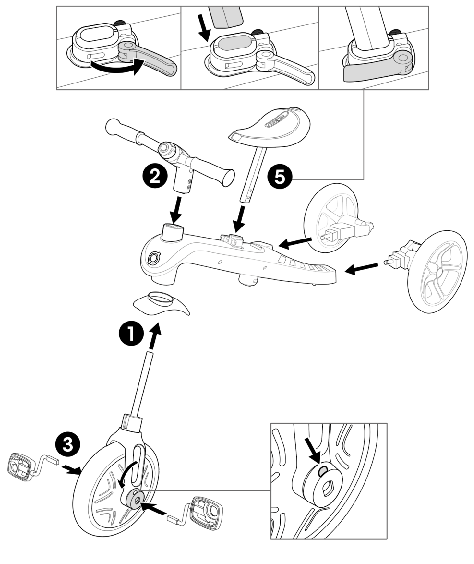
Insert the mudguard on the front wheel. Align the front wheel fork with the trike frame and insert the steering shaft of the fork through the frame.
-
Take the handlebars and align them with the front wheel by making sure the stem of the front wheel's fork slots into the handlebars' column. Make sure the handlebars are placed in the correct direction with the top column facing outwards, away from the seat. Push the handlebars down until you hear a click to securely fix them in place.
In case you installed the handlebars the wrong way, you can remove them by pushing on the metal ball and pulling the handlebar out of the stem.
-
Press and hold the red pedal release tab on the front wheel hub, insert the pedal into the hub aligning the slot in the pedal with the guide in the hub, release the tab and push the pedal in (until you hear a click). Repeat the procedure on the other pedal. Check that the pedals are locked securely in place.
-
Insert the rear wheels into the legs so that the wheels are facing outward and the parking devices are facing up towards the ceiling and push firmly until the wheels click into place.
-
To insert the saddle, you must first open the clamp and press the bottom spring-loaded button on the saddle stem. Then, push the saddle down until you hear a click. Close the clamp. The saddle is adjustable with 2 available heights (31cm; 34cm). The minimum insertion depth is where "MAX" is marked on the stem when placing the top spring-loaded button in the saddle's stem hole. This is the highest height of the saddle. The maximum insertion of the saddle is pushing the saddle down until the saddle's stem is all the way down. This is the lowest height of the saddle.
-
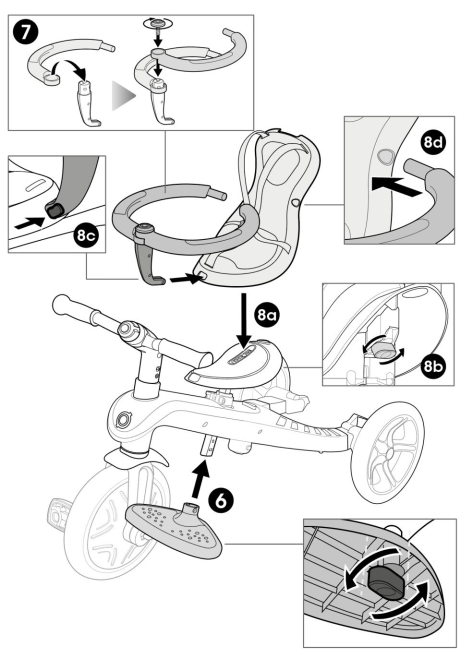
Take the footrest and slide it up the saddle stem. You must press the spring-loaded button at the bottom of the saddle stem; the footrest is secure once you hear a click and twist the knob under the footrest to 90 degrees. The footrest must be facing forwards, not backwards, to be in the correct position.
Check footrest is securely locked before every use.
-
Assemble the safety bar by first unscrewing the top cap of the middle safety bar. Next, put one side of the safety bar on top of the middle safety bar, followed by the other side. Insert the knob back into the slot to secure the safety bar. Correct assembly of the safety bar will show both safety bar sides at the same height.
-
Put the seat on top of the saddle; make sure the knob on the seat is aligned with the saddle slot, so it can slide through the saddle slot. To secure the seat to the saddle, turn the knob under the seat 90 degrees. Insert the middle safety bar in the hole at the front of the seat; press the red button on the side of the middle safety bar and push until the red button is hidden in the seat. Slide the sides of the safety bar into the gaps on the side of the seat.
-
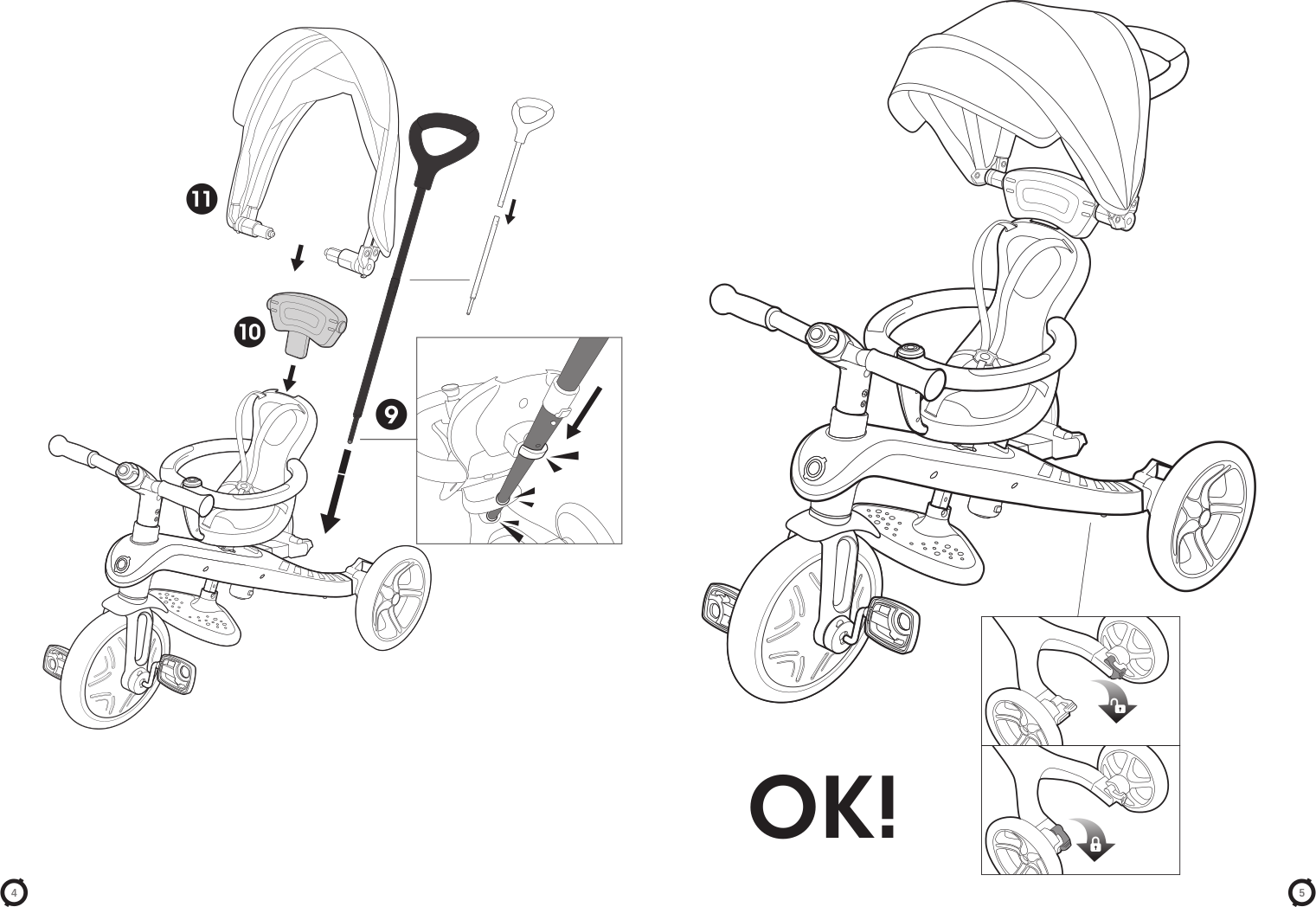
To assemble the parent handlebar, take the top part of the parent handle, where there is the black handle, and place it into the bottom shaft by pressing the spring-loaded button. There are 2 available heights on the parent handlebar (92cm; 96.5cm). Make sure to align the spring-loaded button with the holes; you must hear a click to ensure the handle is securely in place. To secure the parent handlebar to the trike, carefully place the shaft through the saddle's hole and into the hole on the trike's frame. Once you hear a click, the pole is secure.
- To remove the parent handle, you must press the red button under the trike's frame; then release the shaft and carefully lift the parent handle out.
-
Insert the headrest to the seat.
-
Align the ends of the canopy with the side openings located in the upper section of the seat's headrest and push them in until they click into place.
Check the seat and safety bar are securely locked before every use.
Secure your child on the infant trike
- 5-point harness system is set on the seat; adjust the slider on each strap before first use. The shoulder straps and the waist straps should fit firmly around the child.
- To buckle, slot the end of the shoulder strap to the end of the waist strap, do the same on both left and right sides.
- Then, insert both components to the buckle housing on the leg-between strap until you here a click.
- Double check it is securely locked and all the 5 straps' length are well fit to the child.
Always fasten with the 5-point harness while using the trike with the seat on it.
Secure the child in the harness at all times.
How to operate the freewheel mode:
The front wheel has two modes of operation.
- Unlocked mode: when the pedals are turning independently from the front wheel.
- Locked mode: when the pedals and the front wheel are connected together and move as one.
- To put the front wheel in Locked mode, you need to align the spot on the red button to the arrows on the inner hub; press the red button on the locked symbol side until you hear a click.
- To put the front wheel in Unlocked mode, you need to align the spot on the red button to the arrows on the inner hub; press the red button on the unlocked symbol side until you hear a click
Freewheel function is to be used only with the parent handle (Push bar).
Check that the push bar (parent handle) is locked in position before use.
Automatic freewheeling ensures the tricycle can be pushed safely while the child's feet rest on the pedals without the pedals turning.
How to operate the parking devices:
Use the parking devices to lock the rear wheels and keep the trike stationary when required.
-
To lock the parking devices, stop the trike and push down the red parking device on the left wheel with your foot. Once you hear a click, the parking devices will be locked and the trike will remain stationary.
-
To unlock the parking devices, push down the red parking device on the right wheel with your foot. Once you hear a click, the parking devices will be unlocked and the trike will be mobile.
The parking devices located on the rear wheels are NOT TO BE USED TO SLOW DOWN the trike. The left parking device is designed to put the trike into a stationary mode after stopping the trike. The parking devices are not designed for other purposes. Using the parking devices to slow down the trike will cause irreparable damage to the rear wheels' mechanism and must be avoided at all times.
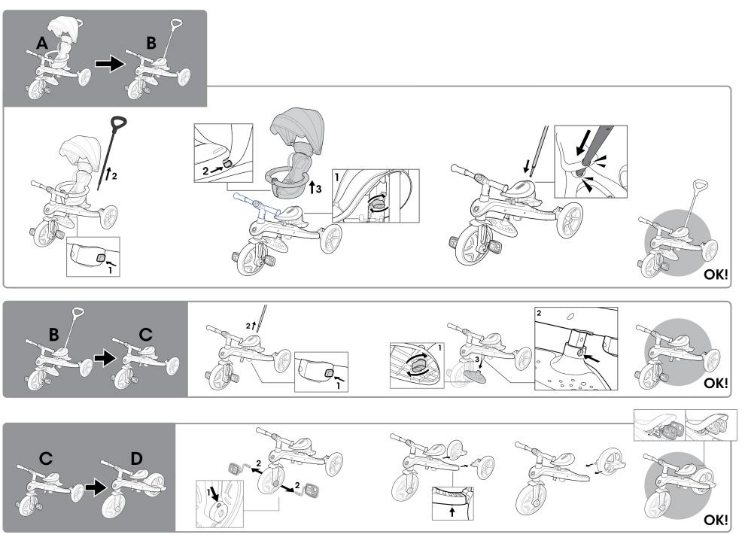
Transform Infant trike to Guided trike (A-B)
- Press the red button at the bottom of the frame to remove the parent handle.
- Press the red button on the side of the middle column of the safety bar to release.
- Under the saddle, turn the knob securing the seat 90 degrees. Lift the seat off the saddle.
- Place the parent handle through the saddle's hole and into the hole on the trike's frame.
- In guided trike stage, the child will start to use the pedals. Ensure that his feet are resting correctly and flat on the pedals.
Transform Guided trike to Training trike (B-C)
- When the child is old enough to pedal, take off the push bar, and put the front wheel in locked mode to allow pedaling.
- Press the red button at the bottom of the frame to remove the parent handle.
- Remove the footrest by turning the knob 90 degrees, then press the spring-loaded button on the left-side of the saddle stem.
- You can store the footrest at the back of the seat by sliding it into its dedicated spot.
Transform Training trike to Balance bike (C-D)
When your child has mastered his/her coordination and balance on the training trike, remove the pedals and transform the rear wheels to allow your child to ride the product as a balance bike:
-
Press the red buttons under the legs to remove the rear wheels.
-
Turn the rear wheels over and reinsert them into the same legs so that the wheels are facing inward (facing each other) and the parking devices are facing down towards the ground, and push firmly until the wheels click into place.
-
Remove the pedals by pressing the pedal release buttons on the front wheel hub. Press the red buttons under the saddle to insert the pedals into the dedicated holes on the back of the saddle for storage.
-
Adjust the saddle height if required. Your child must be able to place his/her feet comfortably on the ground to stop the bike.
-
Braking for balance bike: The balance bike can be braked with the feet. The child can stop the movement by stopping walking or running. Make sure your child is always able to stop at the speed produced and wears suitable footwear.
Do not use in traffic. Protective equipment must be worn. Make sure your child always wears safety equipment (helmet, elbow pads, kneepads and gloves).
IMPORTANT - READ CAREFULLY AND KEEP FOR FUTURE REFERENCE
- Prior to use, make sure that the product has been assembled properly. Check all the connection elements: steering column; footrest; seat; safety belt; safety ring must be correctly adjusted and make sure that the locking mechanisms are securely locked. Check the product before the child rides to determine if there are any potentially hazardous parts or conditions.
- Children should be supervised by adult while riding this product. Special care should be taken to instruct children in safe riding.
- Do not use on the public highways, examples of safe riding area: To be used on flat and no gravel areas (playground, Public Square)
- Do not use this product near a staircase, on a slope, on a road or on a wet surface.
- More mobility child grows; the more potential hazards increase. At home, be sure to remove frames or mirrors hung too low and could break, and any object that could fall in the event of impact. Corner table can also be a danger.
- Do not allow more than one rider on the product at a time.
- Be sure the child wears clothes and appropriate footwear when using product.
- Be sure the rider keeps both hands on the handlebars for proper control.
- Do not allow the rider to wear anything that obstructs hearing and visibility, or which impairs the functioning of product.
- The product should be used with caution since skill is required to avoid falls or collisions causing injury to the user or third parties.
Maintenance and security:
- Security checks: check periodically the product to identify any loose or dislocated element particularly the wheels, pedals, seat and handlebars.
- Periodic cleaning will bring a good life. Wipe the product with a dry cloth if it has been soiled.
- Regularly check the condition of abrasion and avulsion.
- Regularly check that parts are not broken or damaged, if this happens, stop using this product.
- Regular checks can prevent an accident.
Warranty
The manufacturer warranties this product to be free of manufacturing defects for period of 2 years from the date of purchase. This limited warranty does not cover normal wear and tear, tire, tube or cables, or any damage, failure or loss caused by improper assembly, maintenance, or storage.
This limited warranty will be void if the product is ever:
- used in a manner other than for recreation or transportation;
- modified in any way;
- rented
The manufacturer is not liable for incidental or consequential loss or damage due directly or indirectly to the use of this product.
Globber does not offer an extended warranty. If you have purchased an extended warranty, it must be honoured by the store at which it was purchased.
For your records, save your original sales receipt with the physical manual and write the product name below.
Spare parts
To order spare parts for this product, please visit our website globber.com.
Additional info
For questions and inquiries please contact us at: [email protected]